Last reviewed:
Translated from German; if the versions differ, the German version applies.
Tools
All tools run exclusively in your browser. Your input is neither transmitted nor stored. Each tool has its own page with short instructions, its limits and frequently asked questions.
Metrics calculator
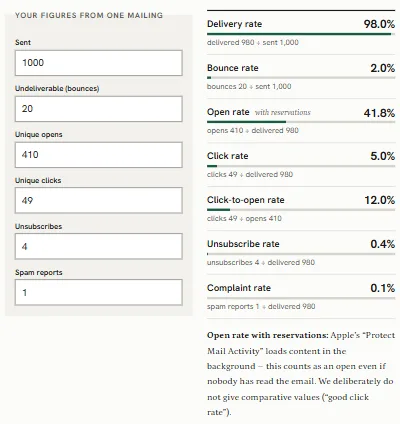
Calculates delivery, bounce, open, click, click-to-open, unsubscribe and complaint rate from the figures of one send and shows the calculation. It deliberately gives no comparative values.
DMARC builder
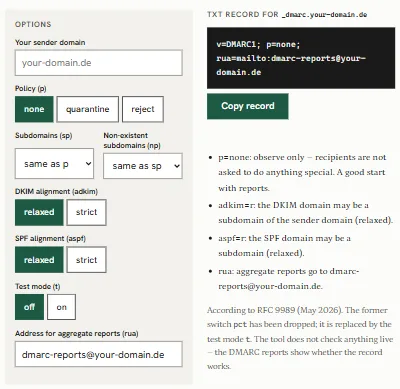
Puts together the DMARC record for your sender domain and explains every option, based on the current version, RFC 9989 (May 2026). It does not query the DNS.
SPF builder
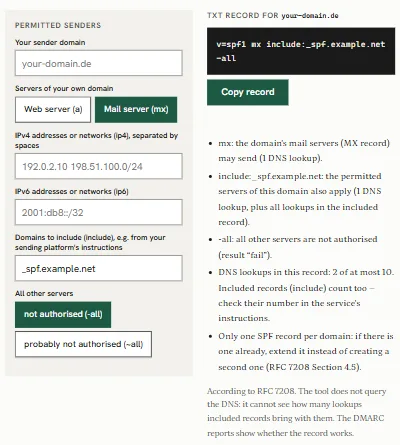
Puts together an SPF record under RFC 7208, counts the record’s DNS lookups and warns if there are more than ten.
Technical checklist before sending
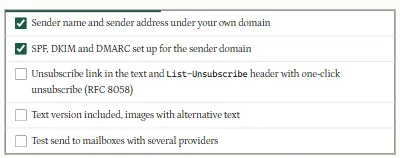
Five technical points to tick off before every send: sender, SPF, DKIM and DMARC, unsubscribing, text version, test send. Legal matters are quoted verbatim under Law.
Checklist for choosing a sending platform
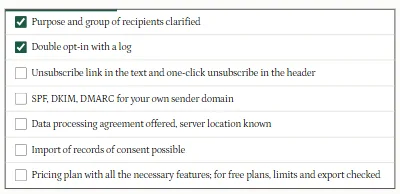
The seven neutral points from Start your own newsletter to tick off when you compare sending platforms.
Subject line preview (phase 2)
Shows how a subject line may be cut off in narrow views. We only give fixed character limits with a source; otherwise they are marked as an example.